
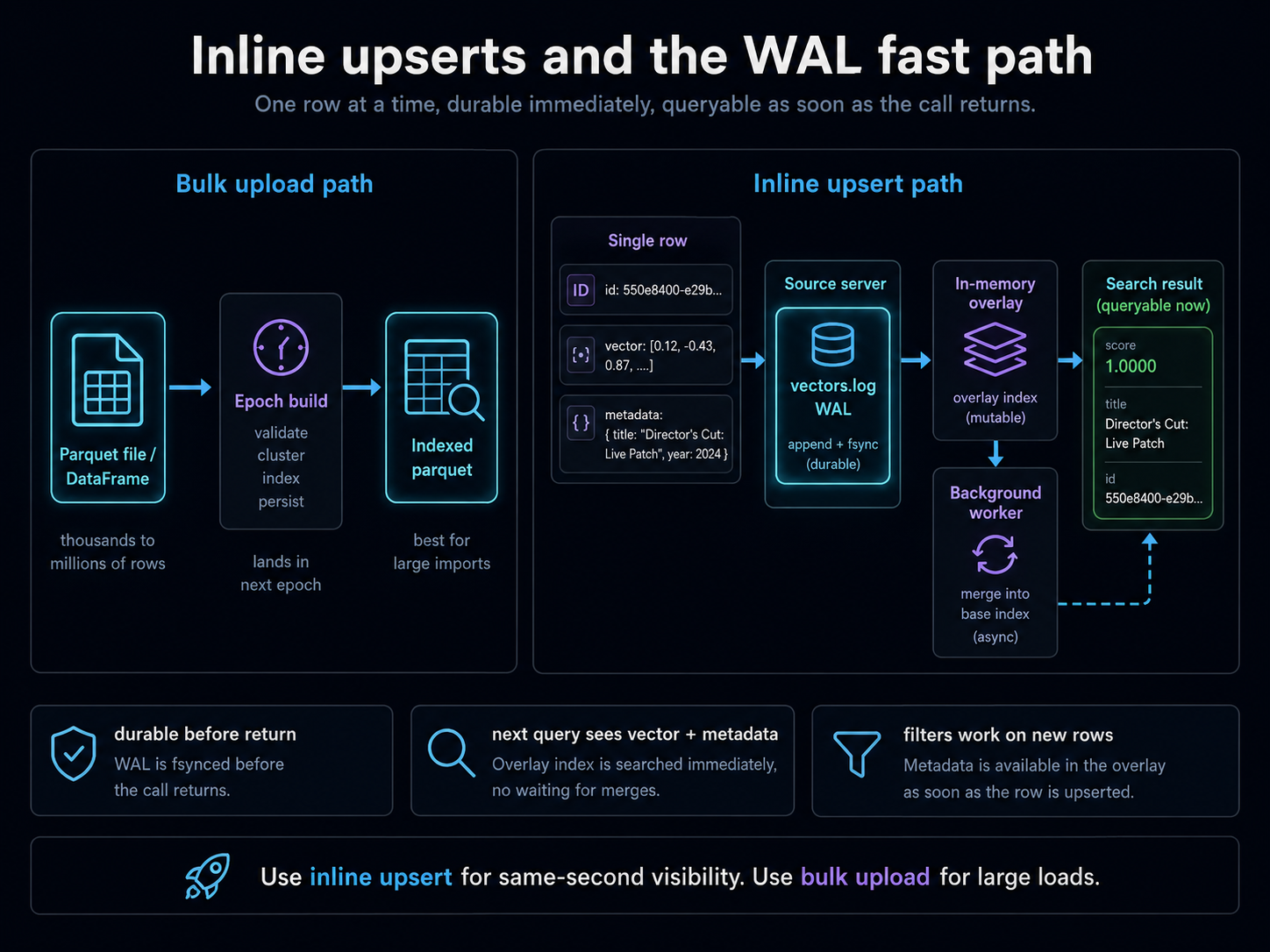
The bulk upload paths (vp.vectors.upsert("col", "data.parquet") or vp.vectors.upsert("col", dataframe=df)) are designed for thousands-to-millions of rows in one shot. They land vectors in the next epoch and get them indexed properly.
Inline upsert is the other shape: one row at a time, written through a Write-Ahead Log on the source server, propagated to the workers as an in-memory overlay, and queryable as soon as the call returns. Designed for the "user clicked Save and now wants their new item to show up in the next search" pattern.
This page is the reference for when to use it, what guarantees it gives you, and the gotchas that bite the first time.
Setup
from veep import VP, samples

df = samples.dataframe()

vp = VP.from_creds()
vp.collections.create("inline-demo", tier="hot")
vp.vectors.upsert("inline-demo", dataframe=df)
The bundled DataFrame ships with pre-computed embeddings, so the initial upload goes through veep directly. Wrap the populated collection in VectorPandaStore for the LangChain query path; inline upserts of pre-computed vectors call store.client.vectors.upsert(...) (LangChain's add_texts is text-first and re-embeds).
from veep import VP, samples
from langchain_huggingface import HuggingFaceEmbeddings
from langchain_vectorpanda import VectorPandaStore

df = samples.dataframe()

vp = VP.from_creds()
vp.collections.create("inline-demo", tier="hot")
vp.vectors.upsert("inline-demo", dataframe=df)

embeddings = HuggingFaceEmbeddings(
    model_name="sentence-transformers/all-MiniLM-L6-v2"
)
store = VectorPandaStore(
    collection_name="inline-demo",
    embedding=embeddings,
    client=vp,
)
Insert one row, query for it immediately
The inline shape: pass vectors=[...] instead of a file path or DataFrame. Each item is a dict with id, vector, and an optional metadata.
qv = list(df[df.id == "film-00002"].iloc[0].vector)

vp.vectors.upsert("inline-demo", vectors=[{
    "id": "demo-quickfix-1",
    "vector": qv,
    "metadata": {
        "title": "Director's Cut: Live Patch",
        "year": 2026,
        "genre": "demo",
    },
}])

results = vp.vectors.query("inline-demo", vector=qv, top_k=3,
                           filter={"id": "demo-quickfix-1"})
for r in results:
    print(f"  {r.score:.4f}  {r.metadata.get('title','?'):<40}  ({r.metadata.get('year','?')}, {r.metadata.get('genre','?')})")
qv = list(df[df.id == "film-00002"].iloc[0].vector)

# Pre-computed vectors drop down to the underlying veep client.
store.client.vectors.upsert("inline-demo", vectors=[{
    "id": "demo-quickfix-1",
    "vector": qv,
    "metadata": {
        "title": "Director's Cut: Live Patch",
        "year": 2026,
        "genre": "demo",
    },
}])

results = store.similarity_search_by_vector_with_score(
    qv, k=3, filter={"id": "demo-quickfix-1"},
)
for doc, score in results:
    m = doc.metadata
    print(f"  {score:.4f}  {m.get('title','?'):<40}  ({m.get('year','?')}, {m.get('genre','?')})")
1.0000 Director's Cut: Live Patch (2026, demo)
The new row is back at score 1.0 because we used its own vector as the query. The query landed milliseconds after the upsert call returned; the row was in the result. No epoch promotion, no rebuild, no waiting.
How it works
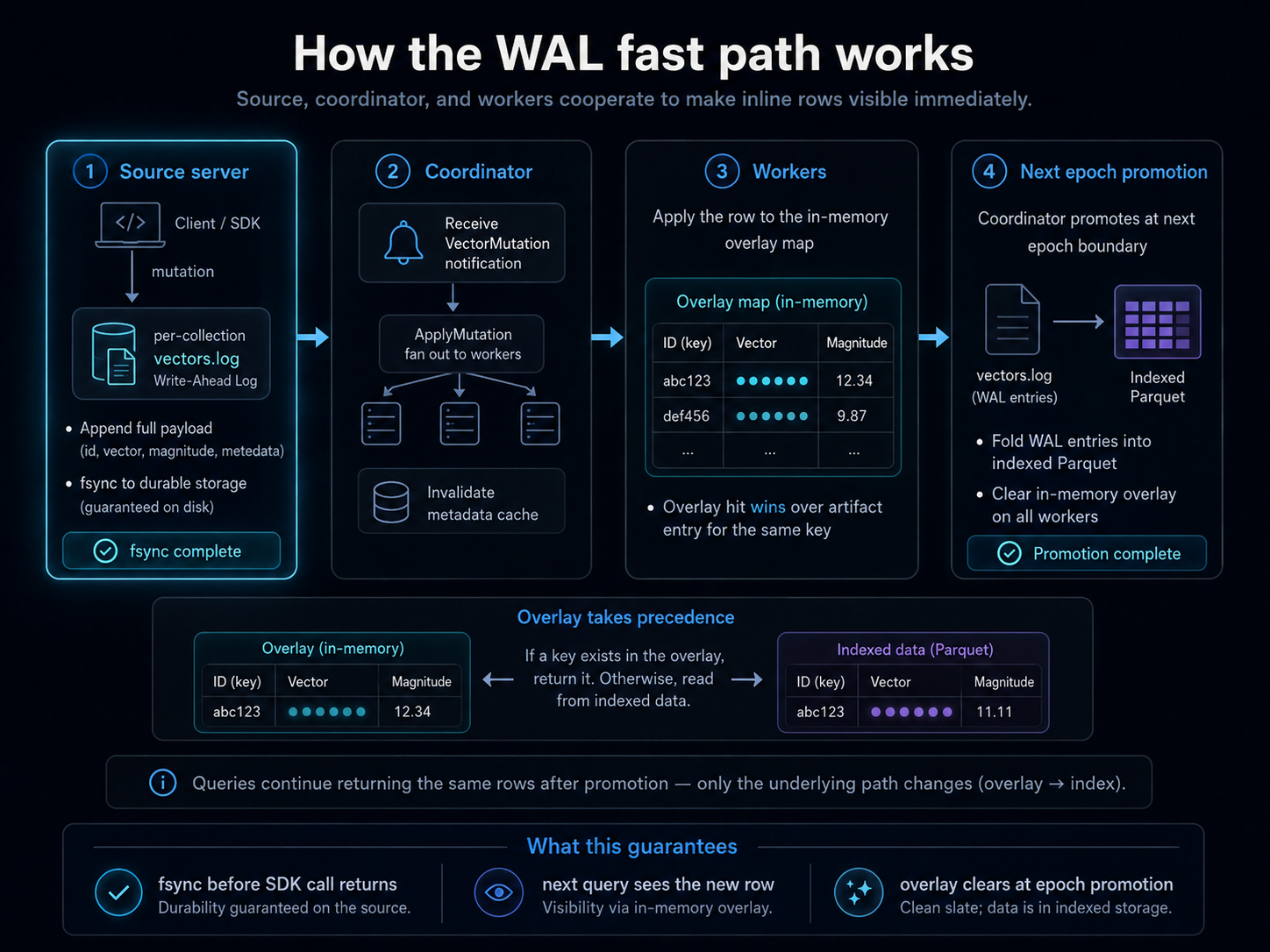
The inline-upsert path goes through three components:
- Source server receives the mutation, writes the full payload (key + vector + metadata) to a per-collection
vectors.logWrite-Ahead Log on disk, fsyncs, and forwards aVectorMutationnotification to the coordinator. - Coordinator receives the notification, fans out an
ApplyMutationmessage to every worker serving that collection, and invalidates its own metadata cache for the collection so the next query rebuilds against the fresh log entry. - Workers apply the upsert to an in-memory overlay map (vector + magnitude). Subsequent searches consult the overlay first; an overlay hit wins over any artifact-resident entry for the same key.
When an epoch is next promoted (a routine background event), the WAL entries fold into the indexed parquet for that collection and the overlay clears.
The customer-facing guarantees you can rely on:
- The mutation is durable on disk before the SDK call returns (source fsyncs
vectors.log). - The next query against the collection sees the new row's vector and metadata.
- Filters work on the new row's metadata fields the same as on bulk-uploaded rows.
Filters work, including on id
A frequent confusion: the row's id is its key (used for routing and lookup), and you might assume it's not available as a metadata field. For inline upsert it is. The SDK auto-mirrors id into the metadata payload so you can filter on it without doing the duplication yourself.
# $ne filter excludes the inline row by id
results = vp.vectors.query("inline-demo", vector=qv, top_k=3,
                           filter={"id": {"$ne": "demo-quickfix-1"}})
for r in results:
    print(f"  {r.score:.4f}  {r.metadata.get('title','?'):<40}  ({r.metadata.get('year','?')})")
# $ne filter excludes the inline row by id
results = store.similarity_search_by_vector_with_score(
    qv, k=3, filter={"id": {"$ne": "demo-quickfix-1"}},
)
for doc, score in results:
    m = doc.metadata
    print(f"  {score:.4f}  {m.get('title','?'):<40}  ({m.get('year','?')})")
  1.0000  The Lion King                             (1994)
  0.7591  The Lion King II: Simba's Pride           (1998)
  0.5560  Madagascar: Escape 2 Africa               (2008)
The Director's Cut row is gone; the next-most-similar items take its place. The $ne filter excludes by id correctly even though the row was just inserted via the WAL path. Same for $nin, $eq, and every other operator covered in the filter syntax tutorial.
Inline delete
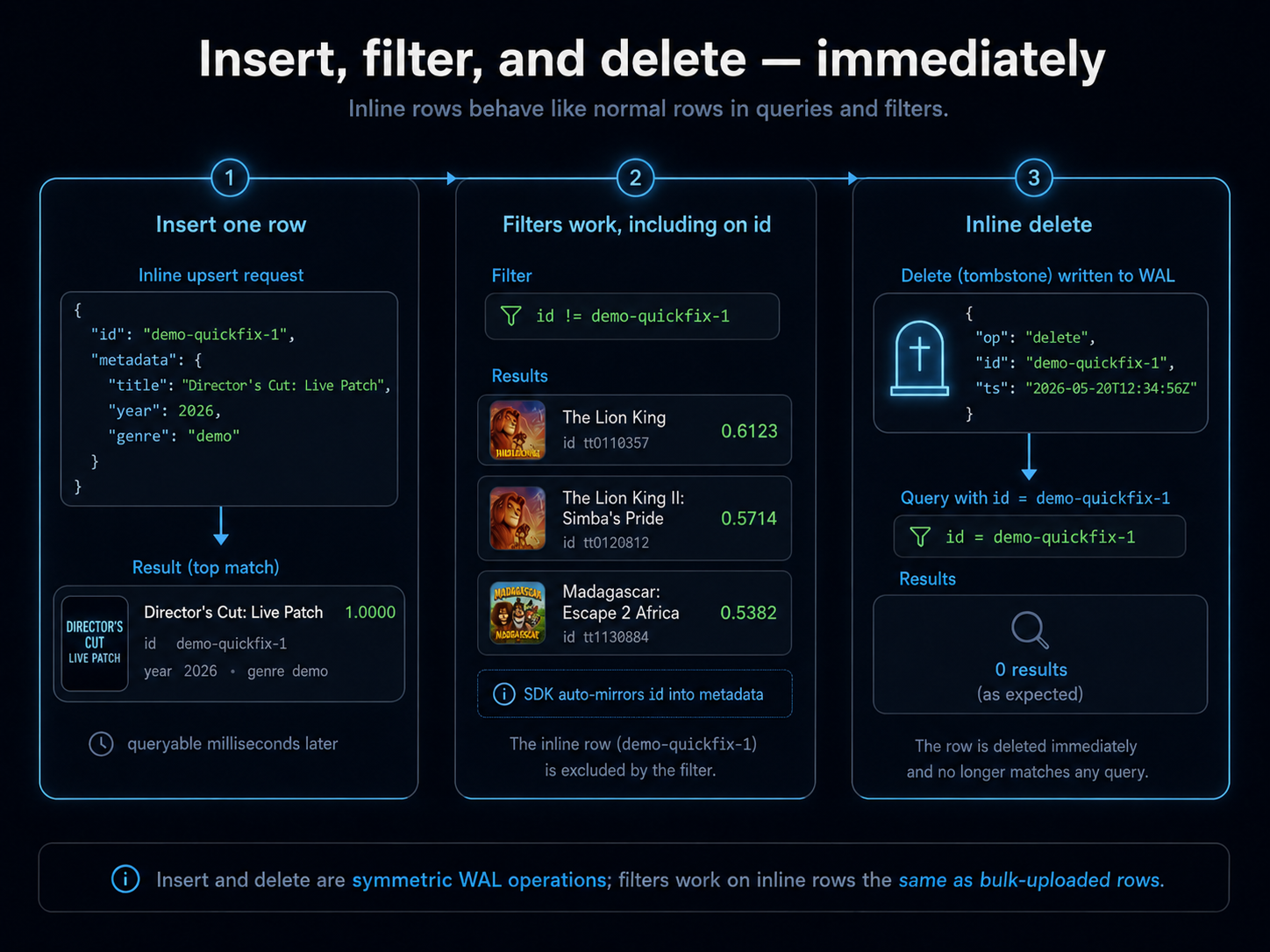
Symmetric to insert. vp.vectors.delete(collection, ids=[...]) writes a tombstone to the WAL; subsequent queries skip the tombstoned key.
vp.vectors.delete("inline-demo", ids=["demo-quickfix-1"])

results = vp.vectors.query("inline-demo", vector=qv, top_k=3,
                           filter={"id": "demo-quickfix-1"})
print(f"  {len(results)} results (expected 0, row is tombstoned)")
store.delete(ids=["demo-quickfix-1"])

results = store.similarity_search_by_vector_with_score(
    qv, k=3, filter={"id": "demo-quickfix-1"},
)
print(f"  {len(results)} results (expected 0, row is tombstoned)")
0 results (expected 0, row is tombstoned)
The tombstone fold-in happens at the next epoch promotion the same as inserts.
Batched inline upsert
You can pass a list of items in one call. The SDK pushes them as one mutation message; the WAL appends them sequentially with monotonic sequence numbers; the worker overlays apply atomically per item.
batch = [
    {"id": f"demo-batch-{i}", "vector": qv,
     "metadata": {"title": f"Batch row {i}", "year": 2026, "genre": "demo"}}
    for i in range(3)
]
vp.vectors.upsert("inline-demo", vectors=batch)

results = vp.vectors.query("inline-demo", vector=qv, top_k=5,
                           filter={"genre": "demo"})
for r in results:
    print(f"  {r.score:.4f}  {r.metadata.get('title','?'):<25}  id={r.metadata.get('id', r.key)}")
batch = [
    {"id": f"demo-batch-{i}", "vector": qv,
     "metadata": {"title": f"Batch row {i}", "year": 2026, "genre": "demo"}}
    for i in range(3)
]
store.client.vectors.upsert("inline-demo", vectors=batch)

results = store.similarity_search_by_vector_with_score(
    qv, k=5, filter={"genre": "demo"},
)
for doc, score in results:
    m = doc.metadata
    print(f"  {score:.4f}  {m.get('title','?'):<25}  id={m.get('id', doc.id)}")
  1.0000  Batch row 2                id=demo-batch-2
  1.0000  Batch row 0                id=demo-batch-0
  1.0000  Batch row 1                id=demo-batch-1
For up to a few hundred items at a time, batched inline upsert is fine. Past that, you cross into "this is really a bulk load," and the file-upload paths are the right shape (parquet streams from disk, no per-row HTTP round-trip).
When NOT to use inline upsert
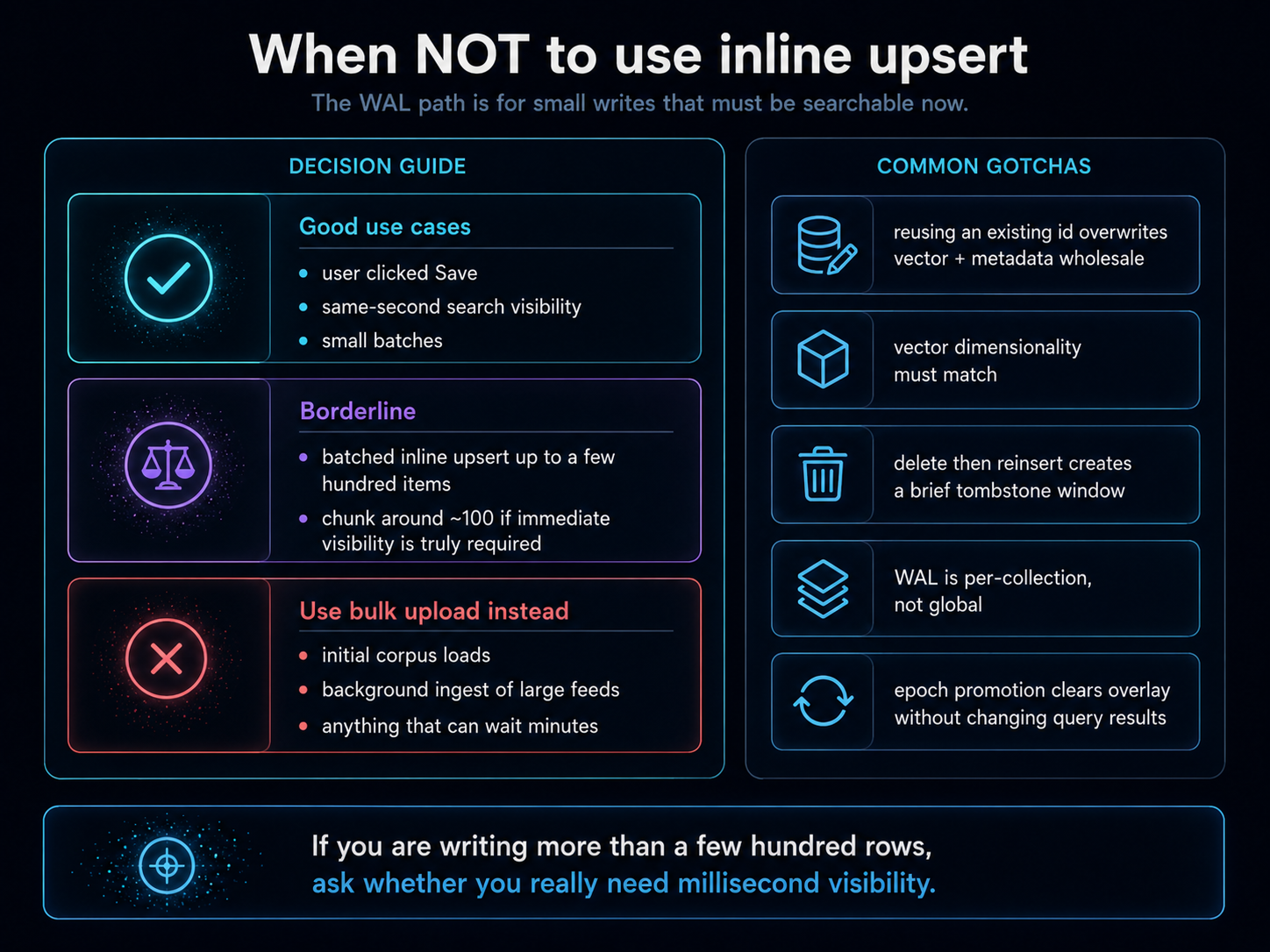
The WAL is optimized for small writes that need to be queryable now. It's not the right shape for:
- Initial corpus loads. A million-row import going through inline upsert would take hundreds of times longer than a Parquet file upload, would generate a giant
vectors.logthat hasn't been indexed yet, and would saturate the worker overlay until the next epoch promotion. Use the file-upload path. - Background ingest of large feeds. Stream the data into Parquet files and upload those.
- Anything that doesn't need same-second visibility. If the next query within a few minutes is fine, file uploads are still simpler and cheaper.
The threshold is fuzzy, but a useful rule: if you're writing more than a few hundred rows, ask whether you really need them to be queryable in milliseconds. If yes, batched inline upsert in chunks of ~100. If no, write a Parquet file and use vp.vectors.upsert(collection, "path/to/file.parquet").
Common gotchas
- Don't reuse keys for "update." An inline upsert with an existing
idoverwrites the existing row's vector and metadata wholesale. There's no per-field merge; the new payload replaces the old. If you only want to change one metadata field, you have to read the existing row, modify, and re-upsert the whole thing. - Vector dimensionality must match. The collection's schema is set on the first ingest. An inline upsert with a wrong-sized vector raises
ValidationErrorbefore the network call. - Don't use inline upsert for delete-then-reinsert if you want continuity. Delete writes a tombstone; the new insert is a fresh row. Anything tracking your row by key sees a brief window where the key resolves to nothing.
- The WAL is per-collection, not global. Heavy inline-upsert traffic on one collection doesn't slow down queries on other collections.
- Epoch promotions clear the overlay. That's by design: once the data is in the indexed parquet, the overlay is redundant. You won't see a behaviour change at promotion time; queries return the same rows just from a different code path.
Related
- The filter syntax tutorial covers every operator you can compose into your inline-upsert query filters.
- The auto-optimize concept page explains how Vector Panda picks the right index after the WAL folds into a fresh epoch.