The homepage gives you the headlines. This page goes deeper into what we mean by “auto-optimized,” how storage-only pricing actually bills, what “bring your own embeddings” gives you in practice, and the shape of the SDK. Real numbers, no mystery boxes.

Most vector databases ask you to pick HNSW or IVF or PQ, then tune a dozen knobs. Vector Panda runs every viable strategy against a sample of your real vectors, measures recall (how often it finds the truly-best neighbors) and p95 latency (the slow-end query time), and runs on whichever sits highest on your data's Pareto frontier, the best mix of fast and accurate.
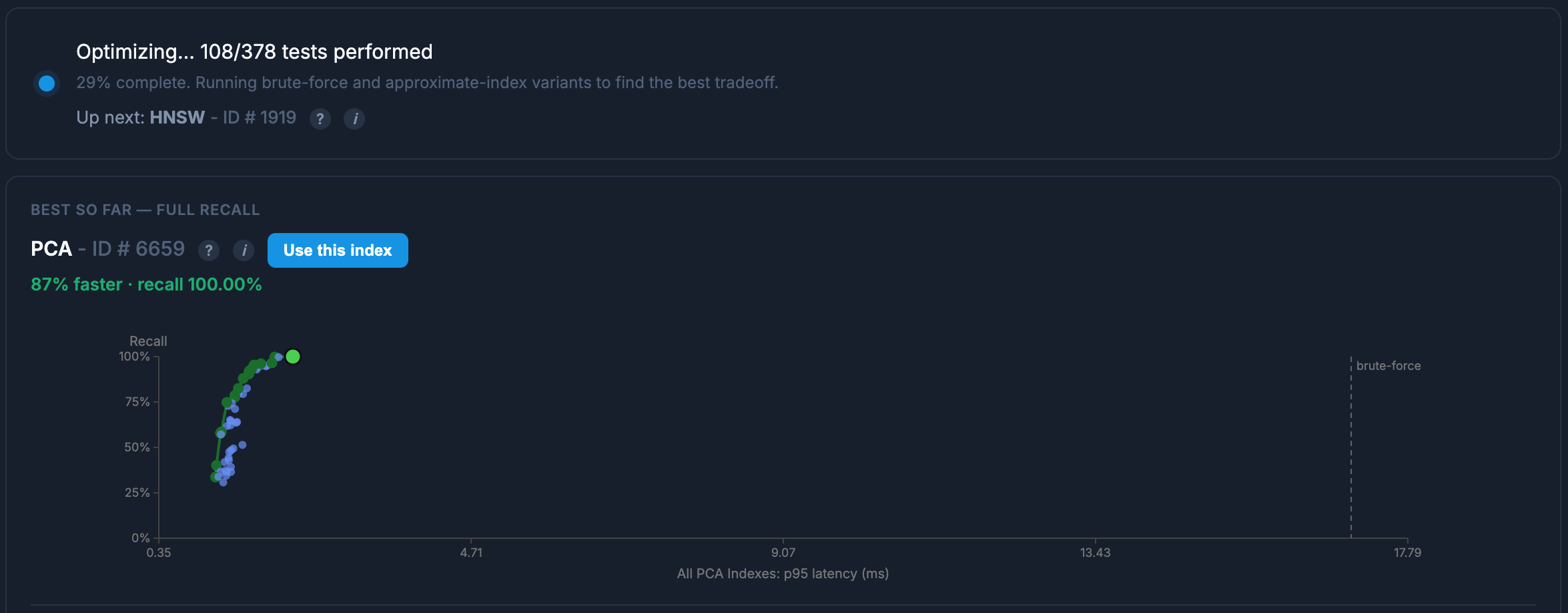
Real run from a customer dashboard. See your own frontier in your collection's view.
For each strategy, on a sample of your vectors: recall against a brute-force ground truth, p95 query latency, and index build cost. Each point on the scatter plot above is one configuration of one strategy. The chosen winner is whichever sits highest on the recall-vs-latency Pareto frontier, the best mix of fast and accurate for the data you actually uploaded.
The winning strategy serves your queries. The losing strategies aren't retained: no shadow indexes burning storage. You can browse the full Pareto frontier in your collection's view, see the dot for the index that's currently live, and read the runner-up gap. Re-runs happen on explicit reindex; we don't quietly swap your index out from under you.
One axis of cost: the GB-months your vectors sit on disk. No per-query meter, no egress charges, no compute-time invoice. Each collection picks its own tier (think of tiers as “how warm should this data be?”) and you can move tiers any time. The same query API runs against any of them.
$5 in monthly usage credits, free to start. No strings, no card required for your first 90 days.
Add a credit card by day 90 to continue the usage credits.
Move a collection between hot, warm, and paused any time. The change is online: no rebuild, no migration, no downtime. Billing follows the new tier immediately, in either direction. The same query API works against any tier; the only thing that changes is how fast and how cheap.
Most archive tiers throw away the index, so restoring is hours of reindexing. Vector Panda's paused tier is pre-indexed: the strategy and hyperparameters we tuned in hot stick around. When you resume, you skip the auto-optimization run and you're query-ready in minutes.
We index whatever vectors you ship, in whichever shape you've already got them. Bring your own embedding model. The dimension and ID column are auto-detected from your first upload, so there's no schema to declare up front. And if you ever want to leave, you leave with everything: full collection export to Parquet, no gates.
OpenAI, Cohere, sentence-transformers, your own. We never call an embedding API on your behalf. You compute the vectors with whichever model fits your domain, ship them to a collection, and we index them as-is. The dimension is auto-detected from your first upload; you don't declare it up front.
Upload a Parquet file, a pandas DataFrame, a pyarrow Table, or a small list of dicts for one-off batches. The SDK serializes through the same chunked-upload pipeline so RAM cost stays bounded by the dataset itself plus one chunk in flight, regardless of the input shape.
Pre-filter on any metadata field with MongoDB-style predicates:
equality, ranges ($gt, $lte), set
membership ($in, $nin), and
$and/$or compositions. No separate filter
index, no rebuilds when filters change. (Pre-filter means we narrow
the candidate set before the similarity search, so a tight
filter both speeds up the query and protects you from the
“100 results, 99 of them filtered out” problem.) Cosine
similarity with a configurable score floor.
Your vectors stay yours, and so does the index we tuned for them.
Export the full collection back to Parquet at any time, and the
winning strategy plus its hyperparameters come along: HNSW
M and efConstruction, IVF nlist
and nprobe, PCA dimensionality, whatever your data
earned. The Pareto-optimal config we found is yours to keep, no
graduate seminar on ANN indexing required. No API gates, no egress
fees, no quota counter.
pip install veep (veep, as in V.P., is the Vector Panda Python SDK), then VP.login() opens your
browser for a one-time OAuth handshake (the same device-flow pattern
gh auth login uses) and saves the credential locally. Six lines
from install to your first semantic search. Four auth modes total. Pick
whichever fits your workflow, from interactive notebooks to CI runners.
None of this needs to be configured, monitored, or worked around. It's the kind of thing that explains why the product behaves the way it does.
Your collection's data lives in versioned epochs across workers. When you add files, the coordinator builds the next epoch in the background; workers load it in parallel; promotion is atomic the moment every worker reports ready. Queries keep serving the current epoch the whole time: no read-only window, no flush-and-reindex blip. Additions-only diffs ship just the new chunks; workers that got nothing simply bump their epoch counter.
The batch ingest pipeline does real work (schema analysis, chunked artifact build, distribution to workers) and that takes a few seconds. For one-off vectors that need to land now, the SDK takes a different path: append to a per-collection write-ahead log, push the mutation to every worker over WebSocket, merge into an in-memory overlay at query time. Measured: p50 5ms, p95 8ms.
HDD for durability. SSD for fanout. RAM for queries. The three pricing tiers aren't just billing buckets, they're three physical storage layers, each picked for what it's best at. Your source files land intact on a redundant ZFS array. Warm artifacts extract to NVMe SSD, NFS-shared to the worker fleet. Hot collections live in worker RAM, answered from memory. Cold data costs cold-data prices, and a hot query never waits on a spinning disk.
Start with $5 in monthly credits.
Get Started →