
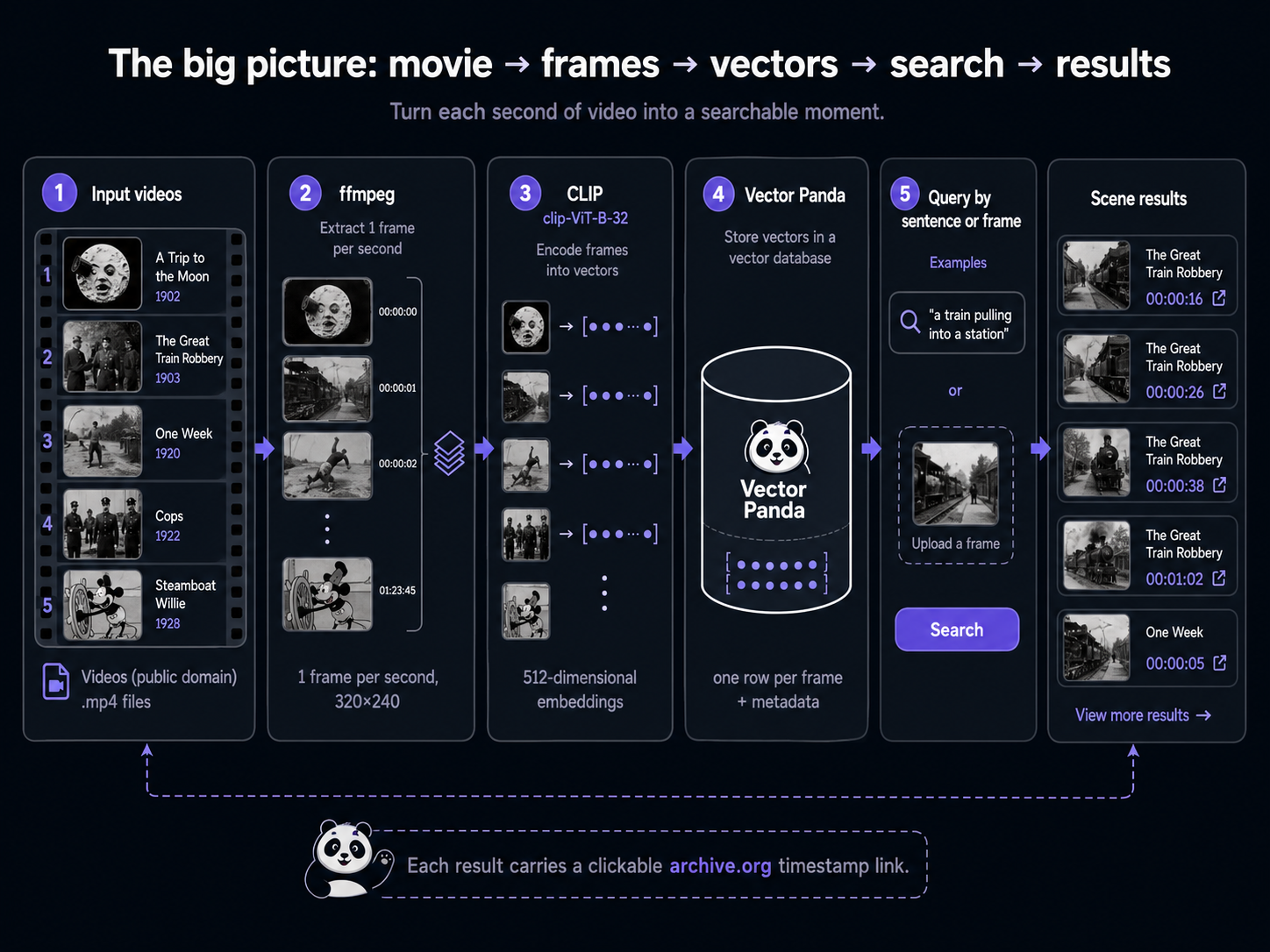
You've watched a film. You half-remember a scene: a rocket landing somewhere strange, a man falling off the side of a house, a cartoon mouse playing music. You don't know the timestamp; you don't even know the film. You'd like to type the scene and get the moment back.
This project walks through it end to end with a real corpus of five short public-domain films from the Internet Archive (Méliès' A Trip to the Moon, Porter's The Great Train Robbery, Keaton's Cops and One Week, Disney's Steamboat Willie). Each frame becomes one row in a Vector Panda collection, and each result row carries a clickable archive.org link with the right #t=<seconds> anchor. Once you've finished, the only line to change to plug in your own films is the list of input videos.
What you need
- Python 3.9 or newer
ffmpeginstalled system-wide (it's the workhorse for splitting video into still frames)- About 5 minutes for setup, 25 minutes to run end to end (CLIP downloads ~600 MB on first call; embedding the full corpus takes about 90 seconds on a fast CPU)
- An internet connection (to fetch the example corpus and to talk to Vector Panda)
pip install veep[pandas,parquet] sentence-transformers pillow
pip install langchain-vectorpanda langchain-huggingface veep[pandas,parquet] sentence-transformers pillow
For ffmpeg:
# macOS
brew install ffmpeg

# Debian / Ubuntu
sudo apt install ffmpeg

# Windows
# Download from https://ffmpeg.org/download.html and add the bin/ folder to PATH
ffmpeg is what slices the video into one-frame-per-second JPEGs we'll feed to the embedder. CLIP itself doesn't know anything about video; the trick is just to treat each second of footage as its own image and let the geometry do the rest.
Get the corpus
Two ways to get one. Pick whichever you prefer.
A. Skip the wait (recommended)
The bundled tarball is the recommended path here, because the build path involves downloading several hundred megabytes of mp4 from the Internet Archive and running ffmpeg over each one. The tarball is ~40 MB, contains 4,291 pre-extracted frames, and lands in seconds.
import tarfile, urllib.request

urllib.request.urlretrieve(
    "https://next.vectorpanda.com/data/example-movieclips.tar.gz",
    "movieclips.tar.gz",
)
with tarfile.open("movieclips.tar.gz") as tf:
    tf.extractall(".")
print("extracted to movieclips/")
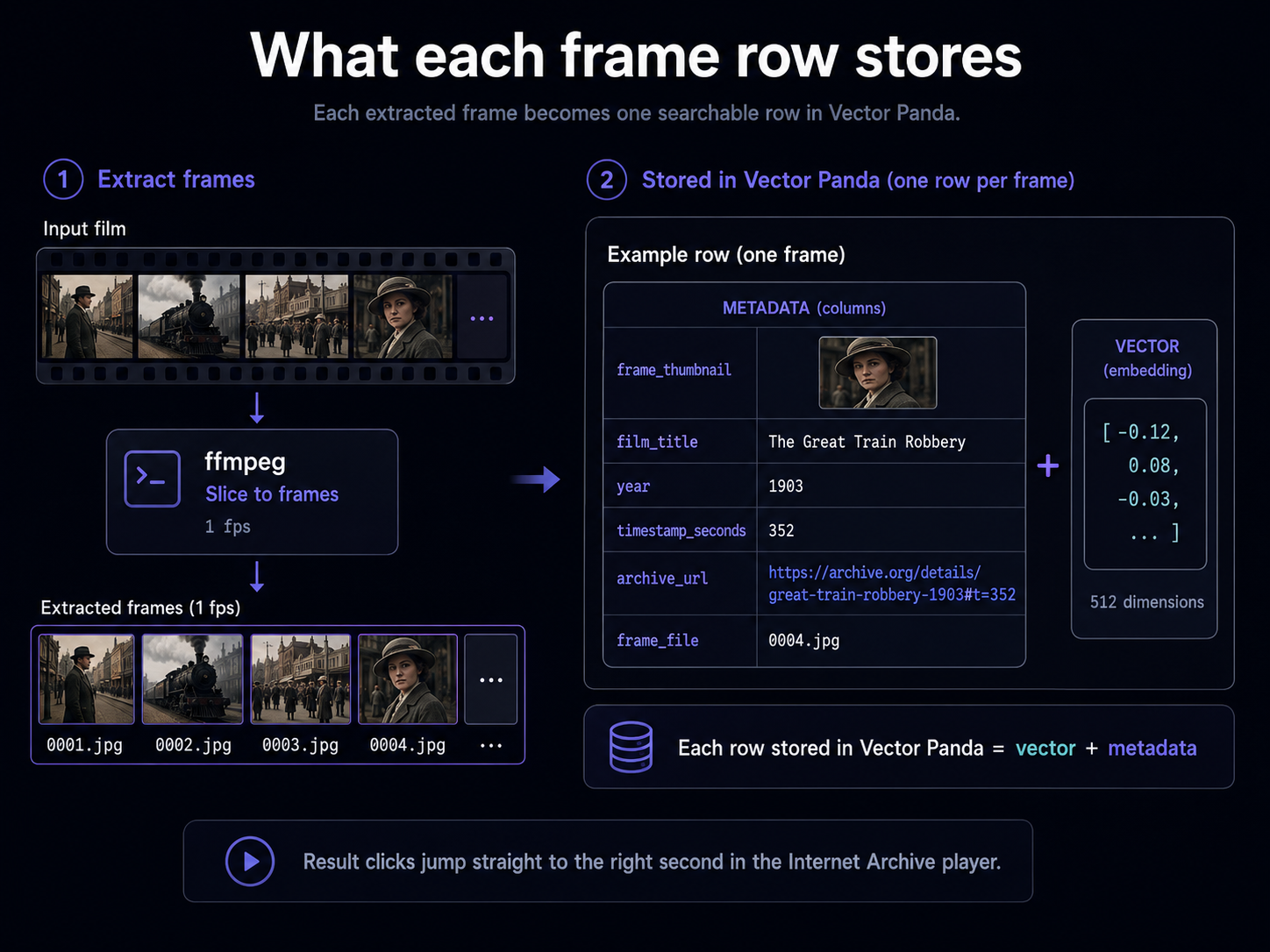
You should now have a movieclips/ folder with frames/<film_id>/NNNN.jpg (one JPEG per second of footage), plus a metadata.json listing every frame's film, timestamp, and archive.org URL.
B. Or build it yourself
This way you watch the data come in, see how ffmpeg slices a video, and the only line to change for your own films is the list of input mp4s. We'll do just one short film (Méliès' A Trip to the Moon, ~13 min, ~50 MB download) so it's fast to follow along; the build script in our repo handles the full five-film corpus the same way.
import json, pathlib, subprocess, urllib.parse, urllib.request

FILM = {
    "film_id": "trip-to-the-moon",
    "film_title": "A Trip to the Moon (Le voyage dans la lune)",
    "year": 1902,
    "director": "Georges Méliès",
    "archive_id": "a-trip-to-the-moon-le-voyage-dans-la-lune-1902",
    "mp4_name": "A Trip to the moon (Le voyage dans la lune) (1902).mp4",
}

out = pathlib.Path("movieclips-build")
frames_dir = out / "frames" / FILM["film_id"]
frames_dir.mkdir(parents=True, exist_ok=True)

mp4_path = out / f"{FILM['film_id']}.mp4"
url = (
    "https://archive.org/download/"
    f"{FILM['archive_id']}/"
    f"{urllib.parse.quote(FILM['mp4_name'])}"
)
print(f"downloading {url}")
req = urllib.request.Request(url, headers={"User-Agent": "movieclip-tutorial/1.0"})
with urllib.request.urlopen(req, timeout=120) as resp, mp4_path.open("wb") as fp:
    fp.write(resp.read())

# 1 frame per second, scaled to 320x240 with letterboxing to preserve aspect.
subprocess.run([
    "ffmpeg", "-loglevel", "error", "-y",
    "-i", str(mp4_path),
    "-vf", "fps=1,scale=320:240:force_original_aspect_ratio=decrease,pad=320:240:(ow-iw)/2:(oh-ih)/2:black",
    "-q:v", "5",
    str(frames_dir / "%04d.jpg"),
], check=True)
mp4_path.unlink()  # discard the mp4 once frames are out

n = len(list(frames_dir.glob("*.jpg")))
rows = []
for i in range(1, n + 1):
    ts = i - 1
    rows.append({
        "film_id": FILM["film_id"],
        "film_title": FILM["film_title"],
        "year": FILM["year"],
        "director": FILM["director"],
        "archive_id": FILM["archive_id"],
        "frame_index": i,
        "timestamp_seconds": ts,
        "archive_url": f"https://archive.org/details/{FILM['archive_id']}#t={ts}",
        "frame_file": f"frames/{FILM['film_id']}/{i:04d}.jpg",
    })
(out / "metadata.json").write_text(json.dumps(rows, indent=2))
print(f"wrote {n} frames + metadata.json to {out}/")
That gives you a one-film version of the same shape as the bundled tarball. To extend to multiple films, swap the single FILM dict for a list and loop the download-and-extract block over each entry; everything downstream (metadata.json, embedding, upload) is identical.
For the rest of this guide we'll assume you took the bundled-tarball path (movieclips/ folder with five films); if you built your own, swap movieclips for movieclips-build everywhere.
Embed your frames
Now turn each frame into a vector. We'll use clip-ViT-B-32, the same OpenAI CLIP model we used in the visual-search project. CLIP embeds both images and text into the same 512-dimensional space, which is what lets you query frames with typed sentences.
import json, pathlib
from PIL import Image
from sentence_transformers import SentenceTransformer

model = SentenceTransformer("clip-ViT-B-32")  # ~600 MB on first call

meta = json.loads(pathlib.Path("movieclips/metadata.json").read_text())
images = [Image.open(f"movieclips/{row['frame_file']}").convert("RGB") for row in meta]

embeddings = model.encode(
    images, batch_size=64, show_progress_bar=True, normalize_embeddings=True,
)
print(f"embedded {len(embeddings)} frames; vector dim = {embeddings.shape[1]}")
After a progress bar, you'll see:
embedded 4291 frames; vector dim = 512
That's about 90 seconds on a fast CPU; longer on a laptop. For a real production use case you'd batch this in the background and only re-embed when films are added or removed.
Upload and query
Pick the upload tab that matches your data shape. Each tab is a complete walkthrough; the query at the end is the same regardless.
If you'd like to hand Vector Panda a file on disk and let it stream the upload (zero-copy from disk), build a parquet file and upsert by path. Best when your dataset is bigger than RAM, or when you already have a parquet pipeline.
import pandas as pd
from veep import VP

df = pd.DataFrame({
    "id": [f"{r['film_id']}-{r['frame_index']:04d}" for r in meta],
    "vector": [e.tolist() for e in embeddings],
    "film_title": [r["film_title"] for r in meta],
    "year": [r["year"] for r in meta],
    "timestamp_seconds": [r["timestamp_seconds"] for r in meta],
    "archive_url": [r["archive_url"] for r in meta],
})
df.to_parquet("movieclips.parquet", index=False)

vp = VP.from_creds()
vp.collections.create("movieclips-from-parquet", tier="hot")
vp.vectors.upsert("movieclips-from-parquet", "movieclips.parquet")

q = model.encode("a rocket landing on the moon's face", normalize_embeddings=True).tolist()
results = vp.vectors.query("movieclips-from-parquet", vector=q, top_k=3)
for r in results:
    m = r.metadata
    ts = int(m.get("timestamp_seconds", 0))
    mins, secs = divmod(ts, 60)
    print(f"  {r.score:.3f}  {m.get('film_title','?')[:32]:<32}  @ {mins}:{secs:02d}  {m.get('archive_url','')}")
If your data already lives in a pandas.DataFrame in memory, skip the parquet step and pass it directly.
import pandas as pd
from veep import VP

df = pd.DataFrame({
    "id": [f"{r['film_id']}-{r['frame_index']:04d}" for r in meta],
    "vector": [e.tolist() for e in embeddings],
    "film_title": [r["film_title"] for r in meta],
    "year": [r["year"] for r in meta],
    "timestamp_seconds": [r["timestamp_seconds"] for r in meta],
    "archive_url": [r["archive_url"] for r in meta],
})

vp = VP.from_creds()
vp.collections.create("movieclips-from-dataframe", tier="hot")
vp.vectors.upsert("movieclips-from-dataframe", dataframe=df)

q = model.encode("a rocket landing on the moon's face", normalize_embeddings=True).tolist()
results = vp.vectors.query("movieclips-from-dataframe", vector=q, top_k=3)
for r in results:
    m = r.metadata
    ts = int(m.get("timestamp_seconds", 0))
    mins, secs = divmod(ts, 60)
    print(f"  {r.score:.3f}  {m.get('film_title','?')[:32]:<32}  @ {mins}:{secs:02d}  {m.get('archive_url','')}")
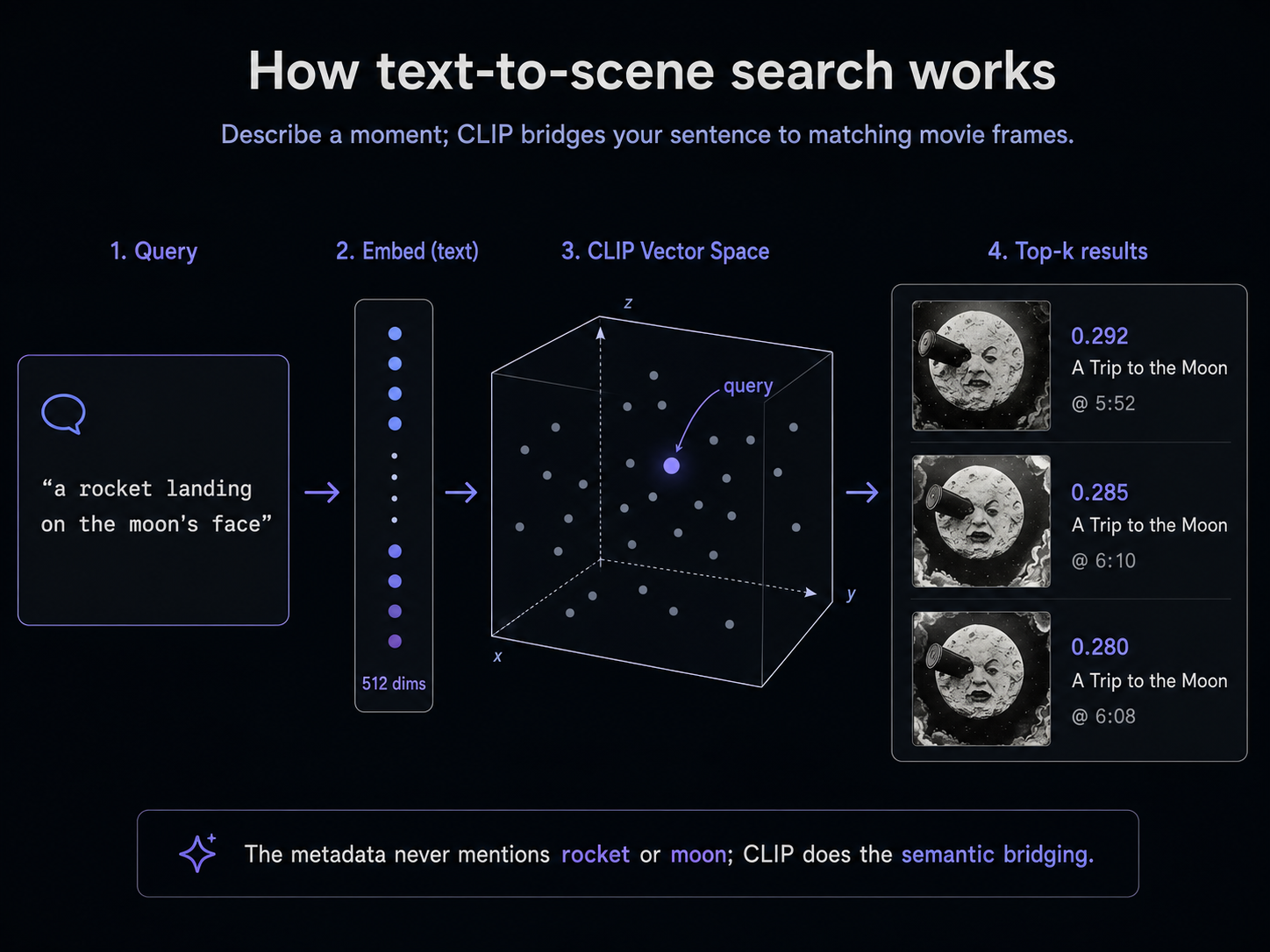
If your query was "a rocket landing on the moon's face", the top three results should all be from A Trip to the Moon, clustered around the famous moon-eye shot. Sample output from the parquet path:
  0.292  A Trip to the Moon (Le voyage dans   @ 5:52  https://archive.org/details/a-trip-to-the-moon-le-voyage-dans-la-lune-1902#t=352
  0.285  A Trip to the Moon (Le voyage dans   @ 6:10  https://archive.org/details/a-trip-to-the-moon-le-voyage-dans-la-lune-1902#t=370
  0.280  A Trip to the Moon (Le voyage dans   @ 6:08  https://archive.org/details/a-trip-to-the-moon-le-voyage-dans-la-lune-1902#t=368
Click the URL. The Internet Archive player will jump straight to the timestamp, and you'll be looking at the famous Méliès moon shot. None of the metadata uses the word "rocket" or "moon"; CLIP is doing all the bridging from your sentence to the frame.
Using LangChain instead
The pre-computed CLIP frame embeddings go through veep directly (LangChain's text-first add_texts would re-embed the entire frame stack). Wrap the populated collection in VectorPandaStore; text queries become a one-liner because the same CLIP model embeds the text side, and frame-to-frame queries take the precomputed-vector path.
from langchain_huggingface import HuggingFaceEmbeddings
from langchain_vectorpanda import VectorPandaStore

embedder = HuggingFaceEmbeddings(model_name="clip-ViT-B-32")  # same CLIP model
store = VectorPandaStore(
    collection_name="movieclips-from-parquet",  # or movieclips-from-dataframe
    embedding=embedder,
    client=vp,
)

# Text query: the store embeds the sentence via CLIP's text encoder.
for doc, score in store.similarity_search_with_score("a rocket landing on the moon's face", k=3):
    m = doc.metadata
    ts = int(m.get("timestamp_seconds", 0))
    mins, secs = divmod(ts, 60)
    print(f"  {score:.3f}  {m.get('film_title','?')[:32]:<32}  @ {mins}:{secs:02d}  {m.get('archive_url','')}")
Frame-to-frame queries (further down) keep model.encode(image) and call store.similarity_search_by_vector_with_score(...) — the LangChain VectorStore interface is text-oriented, but the by-vector path takes any embedding you computed yourself.
More queries to try
We'll set up one more collection from the same vectors so this section is self-contained, runnable whether or not you stuck with the tab above.
import pandas as pd

df = pd.DataFrame({
    "id": [f"{r['film_id']}-{r['frame_index']:04d}" for r in meta],
    "vector": [e.tolist() for e in embeddings],
    "film_title": [r["film_title"] for r in meta],
    "year": [r["year"] for r in meta],
    "timestamp_seconds": [r["timestamp_seconds"] for r in meta],
    "archive_url": [r["archive_url"] for r in meta],
})
vp.collections.create("movieclips-bonus", tier="hot")
vp.vectors.upsert("movieclips-bonus", dataframe=df)

for query in [
    "a steam train rolling through the old west",
    "a man falling off the side of a house",
    "a cartoon mouse playing music",
    "a horse-drawn chase down a street",
]:
    print(f"\n>>> {query}")
    q = model.encode(query, normalize_embeddings=True).tolist()
    for r in vp.vectors.query("movieclips-bonus", vector=q, top_k=3):
        m = r.metadata
        ts = int(m.get("timestamp_seconds", 0))
        mins, secs = divmod(ts, 60)
        print(f"  {r.score:.3f}  {m.get('film_title','?')[:32]:<32}  @ {mins}:{secs:02d}")
import pandas as pd

df = pd.DataFrame({
    "id": [f"{r['film_id']}-{r['frame_index']:04d}" for r in meta],
    "vector": [e.tolist() for e in embeddings],
    "film_title": [r["film_title"] for r in meta],
    "year": [r["year"] for r in meta],
    "timestamp_seconds": [r["timestamp_seconds"] for r in meta],
    "archive_url": [r["archive_url"] for r in meta],
})
vp.collections.create("movieclips-bonus-lc", tier="hot")
vp.vectors.upsert("movieclips-bonus-lc", dataframe=df)

bonus = VectorPandaStore(
    collection_name="movieclips-bonus-lc",
    embedding=embedder,  # the HuggingFaceEmbeddings("clip-ViT-B-32") from above
    client=vp,
)

for query in [
    "a steam train rolling through the old west",
    "a man falling off the side of a house",
    "a cartoon mouse playing music",
    "a horse-drawn chase down a street",
]:
    print(f"\n>>> {query}")
    for doc, score in bonus.similarity_search_with_score(query, k=3):
        m = doc.metadata
        ts = int(m.get("timestamp_seconds", 0))
        mins, secs = divmod(ts, 60)
        print(f"  {score:.3f}  {m.get('film_title','?')[:32]:<32}  @ {mins}:{secs:02d}")
You'll see something like:
>>> a steam train rolling through the old west
  0.319  The Great Train Robbery               @ 5:50
  0.314  The Great Train Robbery               @ 6:03
  0.314  The Great Train Robbery               @ 6:04

>>> a man falling off the side of a house
  0.339  One Week                              @ 9:40
  0.336  One Week                              @ 9:47
  0.331  One Week                              @ 9:48

>>> a cartoon mouse playing music
  0.353  Steamboat Willie                      @ 6:32
  0.349  Steamboat Willie                      @ 7:22
  0.348  Steamboat Willie                      @ 6:51

>>> a horse-drawn chase down a street
  0.331  Cops                                  @ 7:00
  0.324  One Week                              @ 2:27
  0.323  Cops                                  @ 4:08
Every query landed in the right film, and the top hits cluster around the right moment. Each of the printed timestamps is a real archive.org link in the full output (we trimmed the URLs above for readability). Click "9:40 in One Week" and you'll see the famous Keaton stunt where the side of a house falls on him.
These are scores from a run on the day this guide was written. Yours will be slightly different, but the same general matches should land in the top three.
A note on the absolute numbers: cross-modal CLIP scores cluster in the 0.2 to 0.4 range. That's lower than the 0.6 to 0.8 you'll see when both sides are images (the next section), because CLIP's text encoder and image encoder are aligned rather than identical. Don't read 0.32 as a weak match; it's a strong signal in this regime. What matters is the ranking.
Search by frame, not by sentence
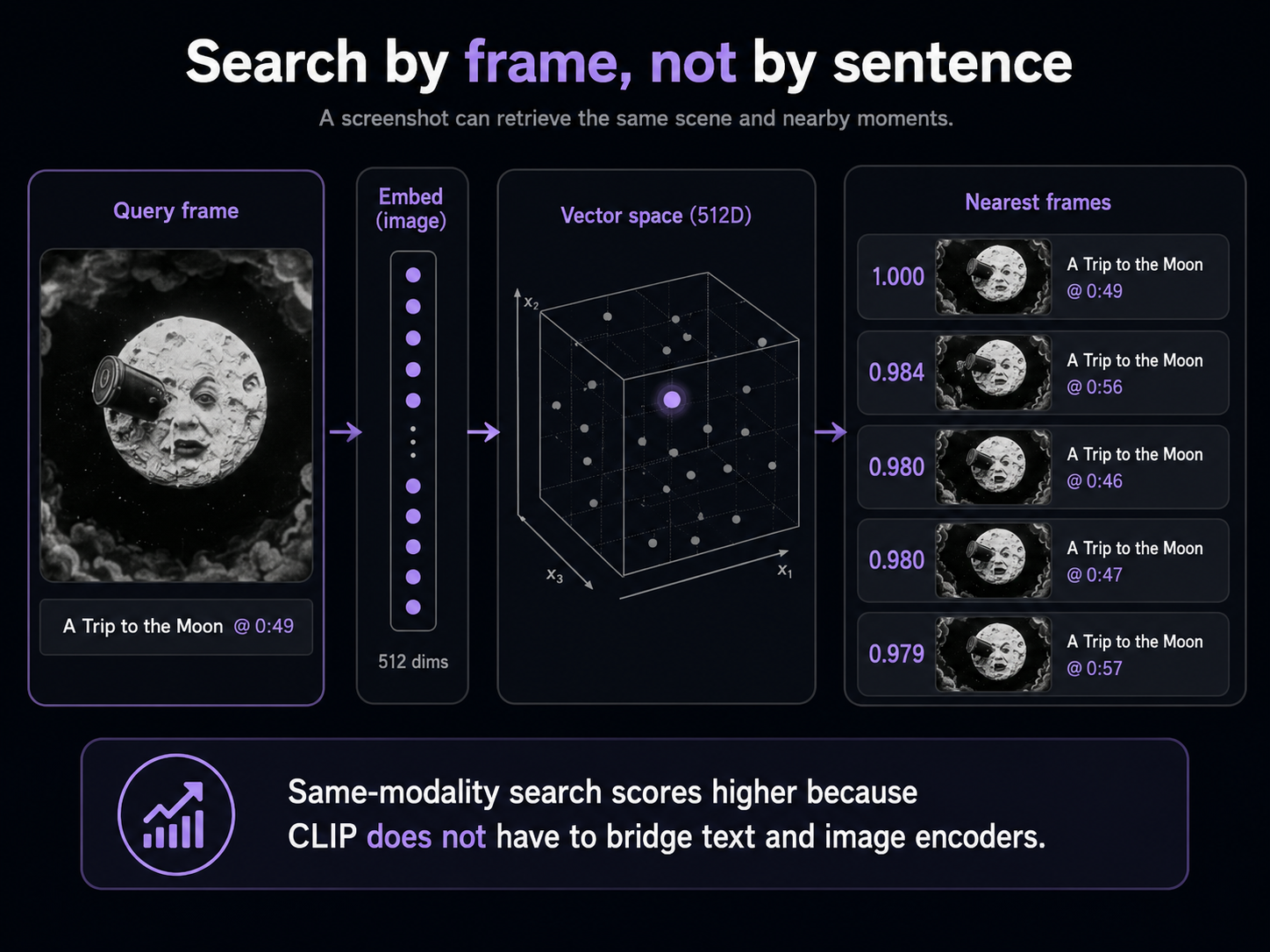
The same trick goes the other way. Hand CLIP an image (a screenshot, a photo, even one of the corpus frames) and it'll find the most visually similar frames in the collection. Useful for "I have a still from this scene, what's its timestamp?" or "what other moments look like this one?"
from PIL import Image

query_img = Image.open("movieclips/frames/trip-to-the-moon/0050.jpg")  # ~0:49 into Méliès
q = model.encode(query_img, normalize_embeddings=True).tolist()
for r in vp.vectors.query("movieclips-bonus", vector=q, top_k=5):
    m = r.metadata
    ts = int(m.get("timestamp_seconds", 0))
    mins, secs = divmod(ts, 60)
    print(f"  {r.score:.3f}  {m.get('film_title','?')[:32]:<32}  @ {mins}:{secs:02d}")
from PIL import Image

query_img = Image.open("movieclips/frames/trip-to-the-moon/0050.jpg")  # ~0:49 into Méliès
q = model.encode(query_img, normalize_embeddings=True).tolist()
for doc, score in bonus.similarity_search_by_vector_with_score(q, k=5):
    m = doc.metadata
    ts = int(m.get("timestamp_seconds", 0))
    mins, secs = divmod(ts, 60)
    print(f"  {score:.3f}  {m.get('film_title','?')[:32]:<32}  @ {mins}:{secs:02d}")
  1.000  A Trip to the Moon (Le voyage dans   @ 0:49
  0.984  A Trip to the Moon (Le voyage dans   @ 0:56
  0.980  A Trip to the Moon (Le voyage dans   @ 0:46
  0.980  A Trip to the Moon (Le voyage dans   @ 0:47
  0.979  A Trip to the Moon (Le voyage dans   @ 0:57
Position 1 is the query frame itself (cosine similarity 1.0). Positions 2 to 5 are all from the same scene a few seconds before and after; CLIP correctly identified that those frames look almost identical, which they are (a 1-fps sample of a multi-second scene gives you several near-duplicate vectors). Notice how much higher the scores are than the cross-modal text queries above. Same-modality search is just easier; CLIP doesn't have to bridge between two encoders.
Now what
You just built a searchable index of a film library that answers natural-language scene descriptions and visual-similarity queries. The pattern works for anything that's "files of video": your security camera archive, your training-video catalog, sports highlight reels, your kids' birthday videos.
To make it yours:
- Replace the FILMS list in the build script with your own video paths (or archive.org identifiers). Everything downstream is the same.
- The 1 fps sample rate is a defensible default but not sacred. Crank it up for action footage where scenes change quickly; drop it for talking-head video where a frame every 5 seconds is plenty. Higher rate means more vectors, higher precision, larger storage; lower rate is the reverse.
- CLIP works well on natural footage and most stylized content. For more specialized domains (medical imagery, satellite tiles, body-cam footage), a domain-tuned visual model will usually beat it.
- If you also want audio search ("the moment when the door slams"), CLAP is the audio analog of CLIP and follows the same recipe: extract audio clips with ffmpeg, embed with CLAP, store and query.
Read the SDK reference for everything vp.vectors.upsert() and vp.vectors.query() can do. The embeddings 101 concept page explains the geometry behind why typing "rocket landing on the moon" finds Méliès.