
vp.vectors.query() does one similarity search per call: one round-trip to the coordinator, one queue slot, one response. That's the right shape for an interactive search box or a single recommendation widget.
vp.vectors.query_batch() packs up to 100 queries into a single HTTP request and returns the results in the same order. It's the right shape when you have a list of items and want them all answered at once: a recommendation backfill, a similarity-matrix build, an offline classification pass.
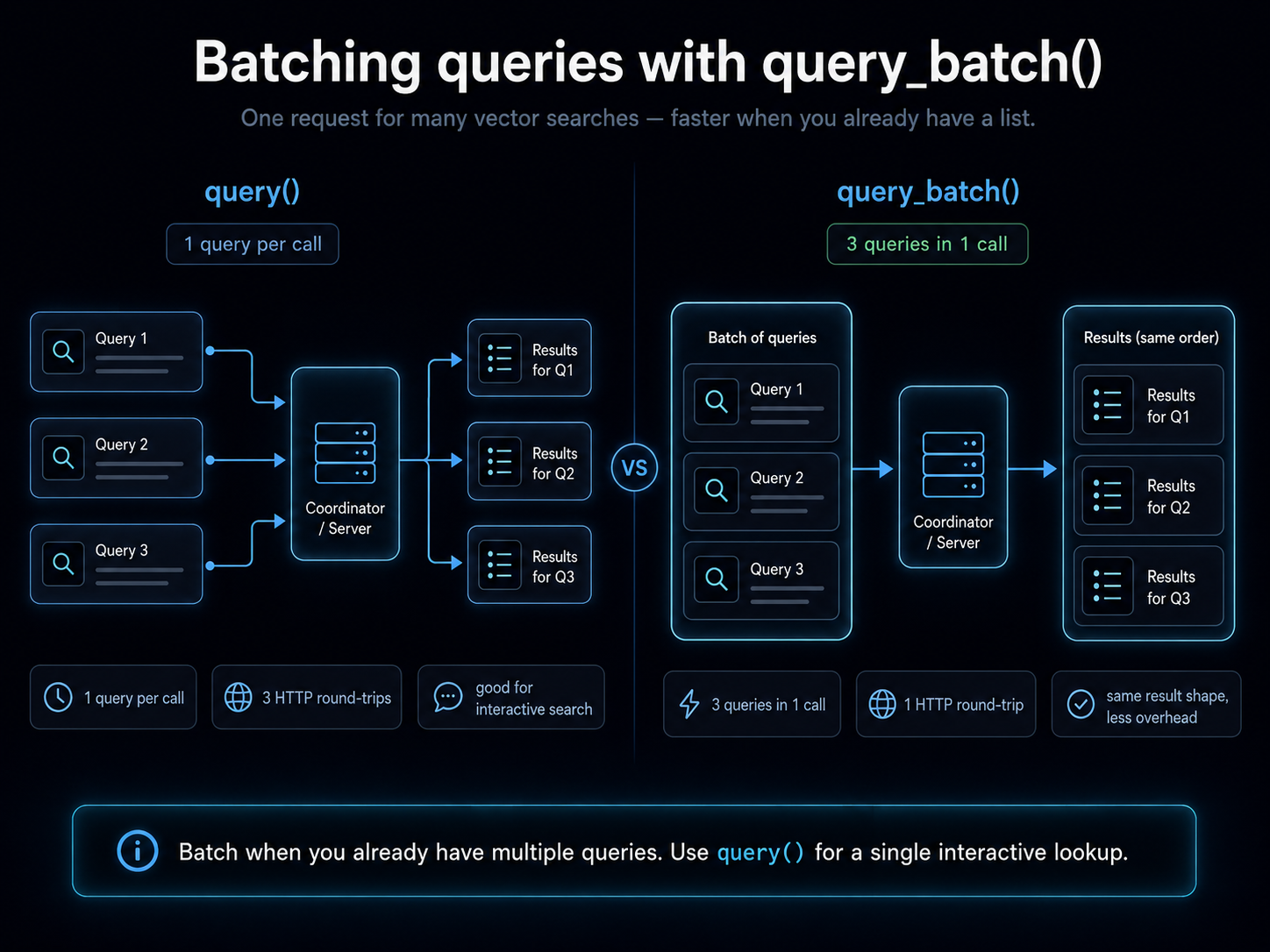
This page covers when each shape wins, what the response looks like, and the gotchas that bite the first time you reach for the batch endpoint.
Setup
from veep import VP, samples

df = samples.dataframe()

vp = VP.from_creds()
vp.collections.create("qbatch-demo", tier="hot")
vp.vectors.upsert("qbatch-demo", dataframe=df)
The LangChain VectorStore interface has no batched query method. If you wrap with VectorPandaStore, reach the batched path through store.client.vectors.query_batch(...) — same call, same response shape.
from veep import VP, samples
from langchain_huggingface import HuggingFaceEmbeddings
from langchain_vectorpanda import VectorPandaStore

df = samples.dataframe()

vp = VP.from_creds()
vp.collections.create("qbatch-demo", tier="hot")
vp.vectors.upsert("qbatch-demo", dataframe=df)

store = VectorPandaStore(
    collection_name="qbatch-demo",
    embedding=HuggingFaceEmbeddings(model_name="sentence-transformers/all-MiniLM-L6-v2"),
    client=vp,
)
The response shape
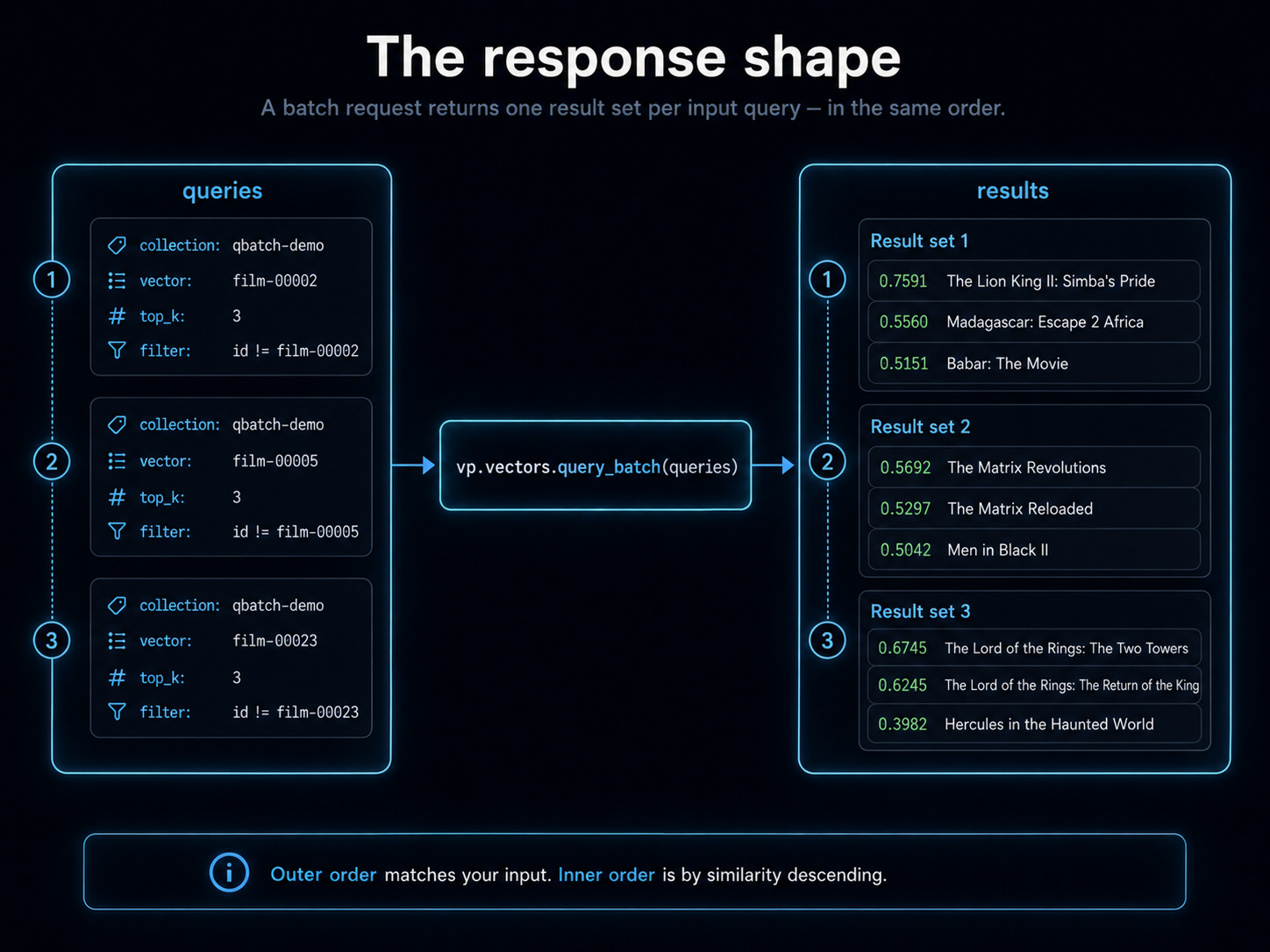
Each query in the batch is a dict with at minimum collection and vector. The response is a list of QueryResults objects, one per input query, in the same order.
queries = [
    {"collection": "qbatch-demo", "vector": list(df[df.id == "film-00002"].iloc[0].vector), "top_k": 3, "filter": {"id": {"$ne": "film-00002"}}},
    {"collection": "qbatch-demo", "vector": list(df[df.id == "film-00005"].iloc[0].vector), "top_k": 3, "filter": {"id": {"$ne": "film-00005"}}},
    {"collection": "qbatch-demo", "vector": list(df[df.id == "film-00023"].iloc[0].vector), "top_k": 3, "filter": {"id": {"$ne": "film-00023"}}},
]

results = vp.vectors.query_batch(queries)

for i, rs in enumerate(results):
    print(f"\nquery {i+1}: nearest neighbours of film {queries[i]['vector'][:1]}...")
    for r in rs:
        m = r.metadata
        print(f"  {r.score:.4f}  {m.get('title','?')[:35]:<35}  ({m.get('year','?')})")
queries = [
    {"collection": "qbatch-demo", "vector": list(df[df.id == "film-00002"].iloc[0].vector), "top_k": 3, "filter": {"id": {"$ne": "film-00002"}}},
    {"collection": "qbatch-demo", "vector": list(df[df.id == "film-00005"].iloc[0].vector), "top_k": 3, "filter": {"id": {"$ne": "film-00005"}}},
    {"collection": "qbatch-demo", "vector": list(df[df.id == "film-00023"].iloc[0].vector), "top_k": 3, "filter": {"id": {"$ne": "film-00023"}}},
]

results = store.client.vectors.query_batch(queries)

for i, rs in enumerate(results):
    print(f"\nquery {i+1}: nearest neighbours of film {queries[i]['vector'][:1]}...")
    for r in rs:
        m = r.metadata
        print(f"  {r.score:.4f}  {m.get('title','?')[:35]:<35}  ({m.get('year','?')})")
Each QueryResults iterates the same as a single-call response. Ordering of the inner lists is by similarity descending; ordering of the outer list matches your input order.
Real output from a run on the bundled corpus:
query 1: nearest neighbours of The Lion King (film-00002)
  0.7591  The Lion King II: Simba's Pride      (1998)
  0.5560  Madagascar: Escape 2 Africa          (2008)
  0.5151  Babar: The Movie                     (1989)

query 2: nearest neighbours of The Matrix (film-00005)
  0.5692  The Matrix Revolutions               (2003)
  0.5297  The Matrix Reloaded                  (2003)
  0.5042  Men in Black II                      (2002)

query 3: nearest neighbours of Fellowship of the Ring (film-00023)
  0.6745  The Lord of the Rings: The Two Towe  (2002)
  0.6245  The Lord of the Rings: The Return o  (2003)
  0.3982  Hercules in the Haunted World        (1961)
Same as you'd get from three separate vp.vectors.query(...) calls, just delivered in one round-trip.
When batching wins (and when it doesn't)
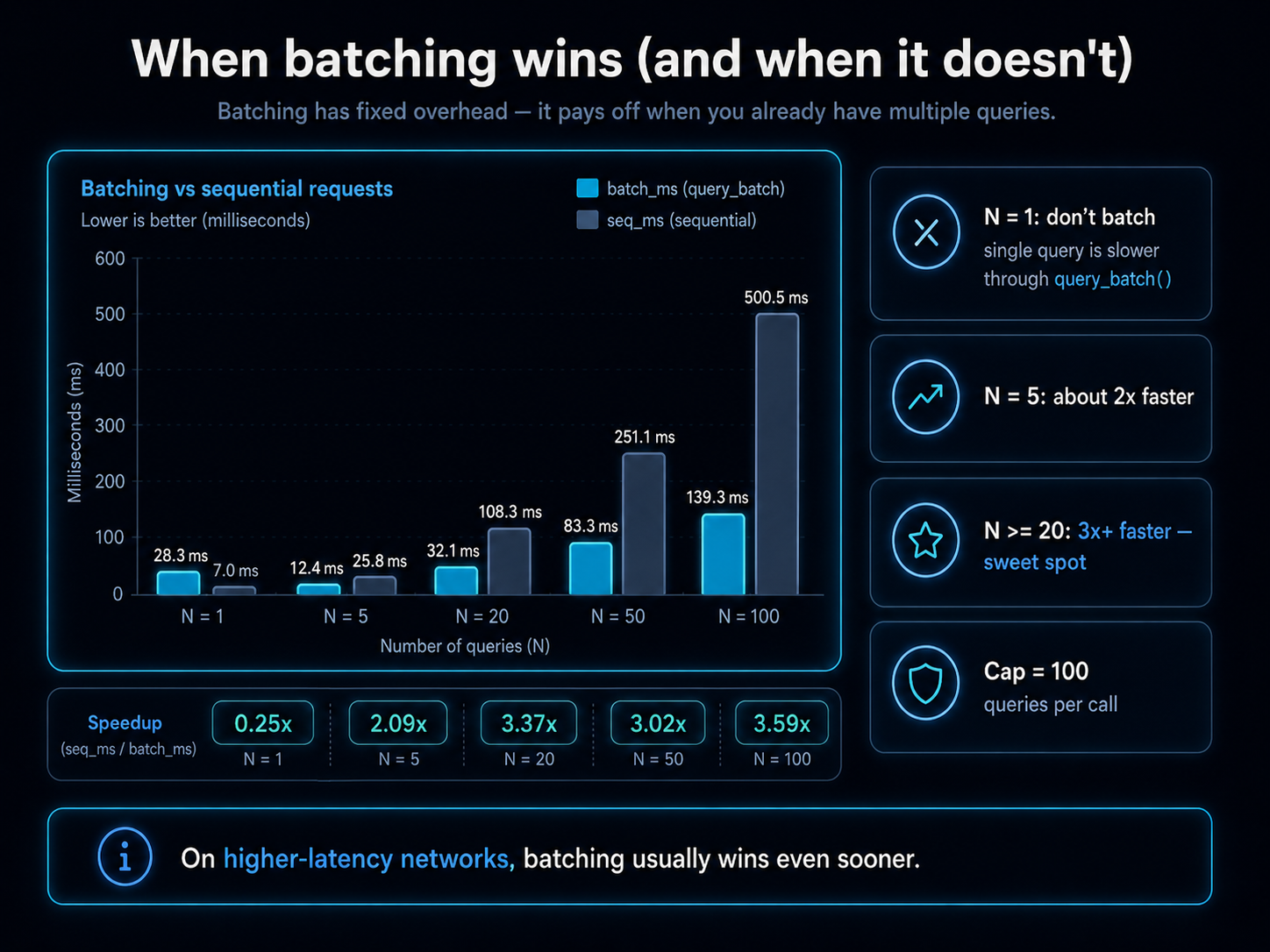
The interesting question isn't "is batch faster" but "when." Real timings against a 5,000-row corpus on the same LAN:
    N    batch_ms      seq_ms   speedup
    1        28.3         7.0      0.25x
    5        12.4        25.8      2.09x
   20        32.1       108.3      3.37x
   50        83.3       251.1      3.02x
  100       139.3       500.5      3.59x
A few takeaways:
- N = 1: don't batch. A single-query call to
query_batchis slower than callingquery()directly. The batch endpoint has fixed overhead that pays off only across multiple queries. - N = 5: roughly 2× faster. Worth doing if you already have a list.
- N ≥ 20: 3×+ faster. This is the sweet spot. The savings compound because you eliminate one round-trip per query.
- N capped at 100. The SDK rejects batches over 100 with
ValidationError. If you have more than 100 queries, chunk into batches of 100.
These numbers are LAN. On a higher-latency link (residential broadband to the cloud, mobile, cross-region), the per-call overhead is dominated by the network round-trip itself, and batching wins much sooner. The 3× speedup on LAN becomes 10× or more on a satellite link.
Mixed-collection batches
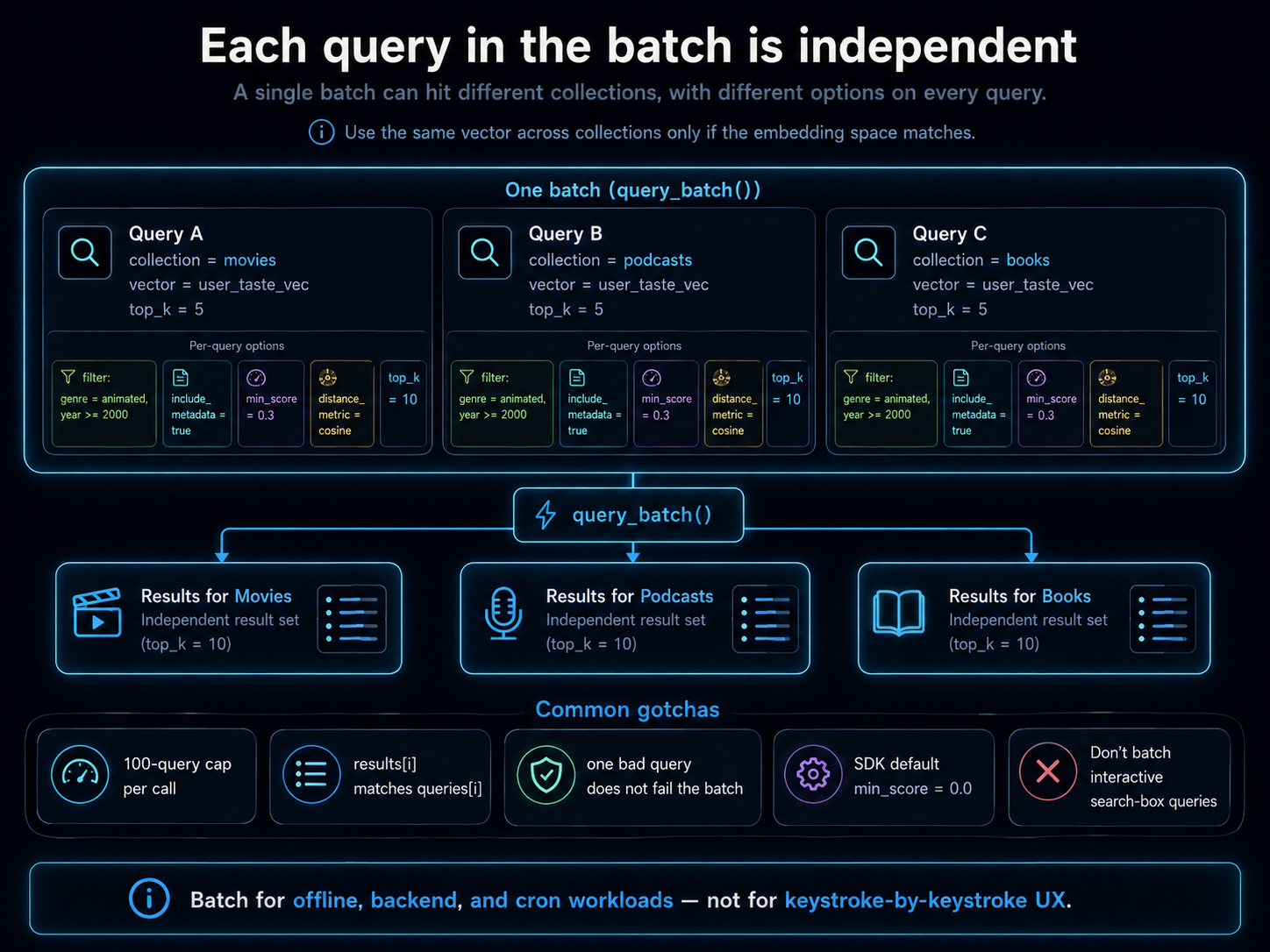
Each query in the batch carries its own collection field, so a single batch can hit several collections at once. Useful when your app has separate collections per content type and a single user action needs results from all of them.
queries = [
    {"collection": "movies",   "vector": user_taste_vec, "top_k": 5},
    {"collection": "podcasts", "vector": user_taste_vec, "top_k": 5},
    {"collection": "books",    "vector": user_taste_vec, "top_k": 5},
]
results = vp.vectors.query_batch(queries)
queries = [
    {"collection": "movies",   "vector": user_taste_vec, "top_k": 5},
    {"collection": "podcasts", "vector": user_taste_vec, "top_k": 5},
    {"collection": "books",    "vector": user_taste_vec, "top_k": 5},
]
results = store.client.vectors.query_batch(queries)
The same vector works across collections only if their embedding models produce the same dimensionality and the same semantic space. If they don't, embed separately for each collection and pass the right vector.
Per-query options
Anything you can pass to query() you can pass per-element to query_batch(). Common ones:
queries = [
    {
        "collection": "qbatch-demo",
        "vector": list(df[df.id == "film-00002"].iloc[0].vector),
        "top_k": 5,
        "filter": {"genre": "animated", "year": {"$gte": 2000}},
        "include_metadata": True,
        "min_score": 0.3,
    },
    {
        "collection": "qbatch-demo",
        "vector": list(df[df.id == "film-00005"].iloc[0].vector),
        "top_k": 10,
        "distance_metric": "cosine",
    },
]
results = vp.vectors.query_batch(queries)
queries = [
    {
        "collection": "qbatch-demo",
        "vector": list(df[df.id == "film-00002"].iloc[0].vector),
        "top_k": 5,
        "filter": {"genre": "animated", "year": {"$gte": 2000}},
        "include_metadata": True,
        "min_score": 0.3,
    },
    {
        "collection": "qbatch-demo",
        "vector": list(df[df.id == "film-00005"].iloc[0].vector),
        "top_k": 10,
        "distance_metric": "cosine",
    },
]
results = store.client.vectors.query_batch(queries)
The two queries in this batch ask for different top_k, different filters, different min-score thresholds. They're independent except for being delivered in one HTTP round-trip.
Common gotchas
- The 100-query cap is per call, not per second. If you have 5,000 queries to issue, you'll do 50 batches of 100. The cap is there to keep any single request from blocking the coordinator's queue too long.
- Order is preserved.
results[i]corresponds toqueries[i]. Don't sort the outer list expecting it to be re-keyed by anything. - One bad query doesn't fail the batch. If query 7 of 50 has a malformed filter, the response is 50 result sets and query 7's is empty (with the error surfaced inline). Read your input back if you're confused why one row came back blank.
min_score=0.0is the SDK default. The coord's bare-API default is0.7, butquery_batch()(likequery()) injectsmin_score=0.0so you see all hits unless you opt out. Set it explicitly if you want the higher threshold.- Don't batch interactive queries. A user typing in a search box wants the result back as soon as it's ready, not after you've collected enough queries to fill a batch. Batching is for offline / backend / cron workloads.
Related
- The filter syntax tutorial covers the operators you'll compose into per-query
filter=clauses. - The SDK reference documents the full single-query API.